Surveys with analytics and AI,
free to start.
Build the survey, share it by link, WhatsApp or QR, and see results broken down by group. Without paying extra for every feature you need.
Free plan forever · No credit card required
Customer satisfaction survey
How satisfied are you with our service?
Why we built SurvIQ
- Google Forms
- Easy and free, but results stop at pie charts. Cross-tabbing is up to you in a spreadsheet.
- SurveyMonkey
- It has almost everything, but the useful parts sit in expensive plans and the price climbs fast when you need more.
- Excel
- You control everything, but every report costs you hours of copying and filtering by hand.
We wanted something easy to build, with real analysis and a price that does not explode as you grow. That is SurvIQ.
Everything you need, from the first question to the report
Build the survey in minutes
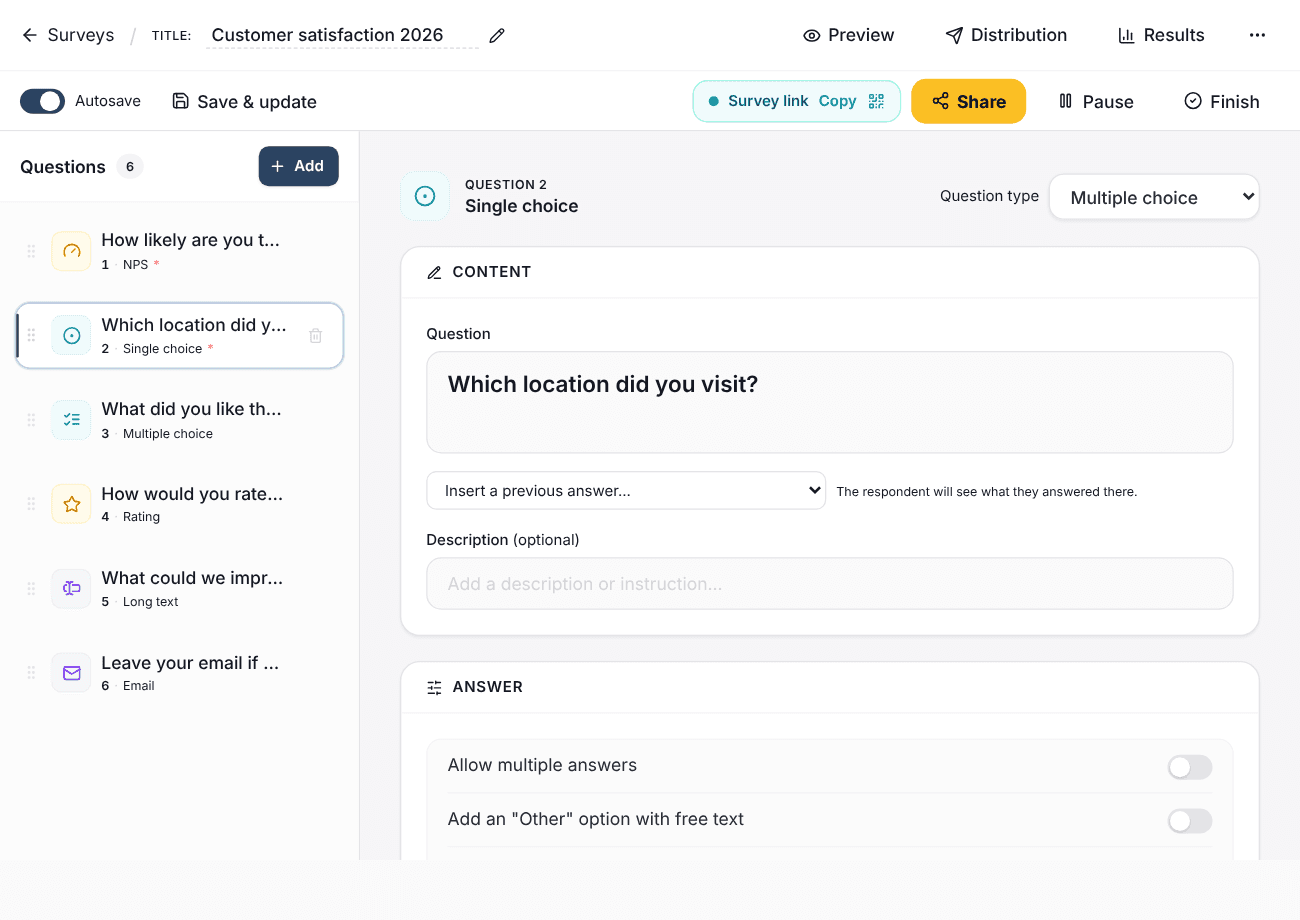
Pick from 15+ question types and decide what each person sees based on their answers.
- Multiple choice, scales, NPS, matrices, ranking, file upload and signature
- Conditional logic to skip or show questions
- Quiz mode: mark the right answers and SurvIQ scores each person
Share it where your people are
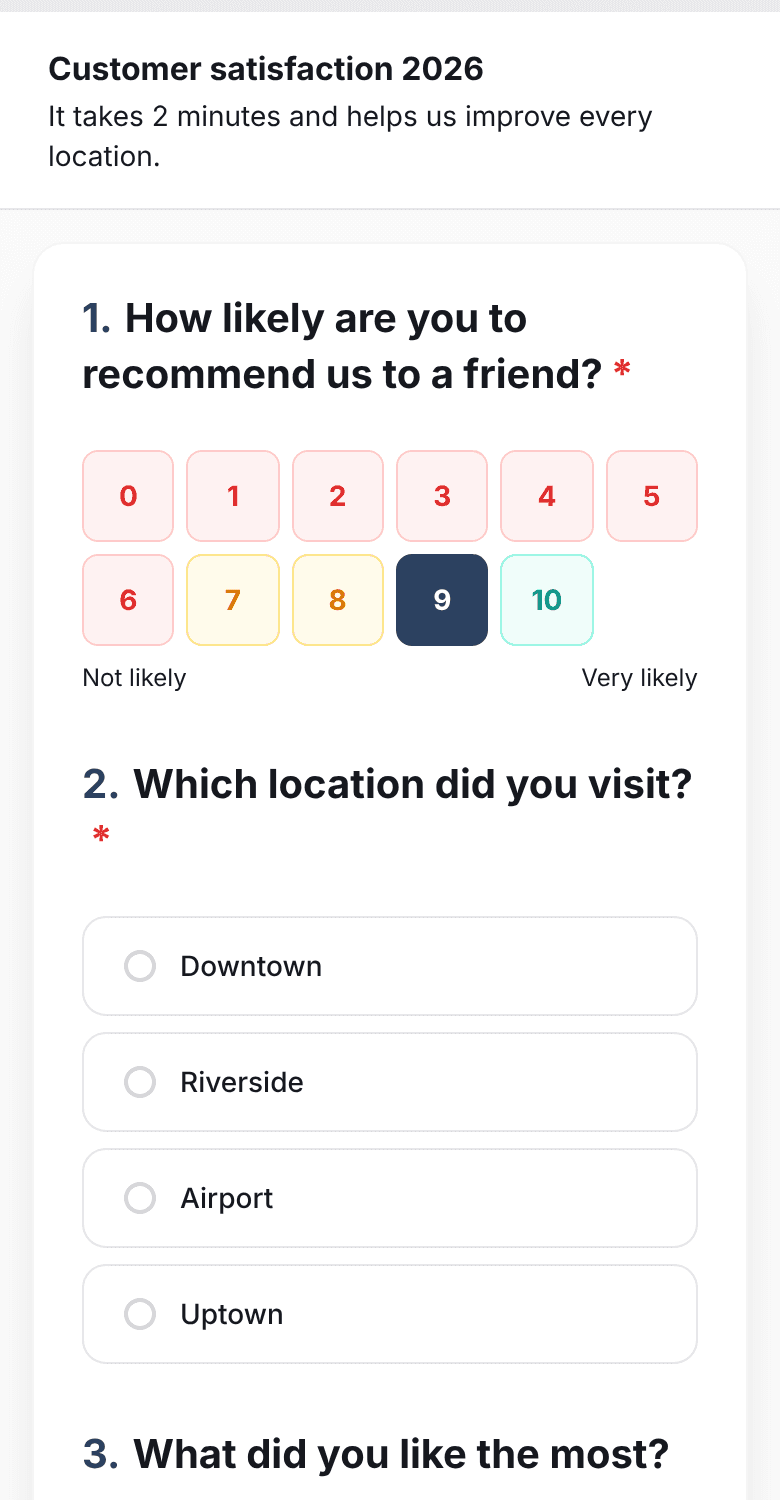
Respondents answer from their phone without creating an account or downloading anything.
- Link, WhatsApp, QR or email from your own account
- Contact lists that track who has responded
- Your logo, colors and background on every survey
- In English, Spanish, Portuguese, French, German or Italian, with translations in the same survey
See what the answers say
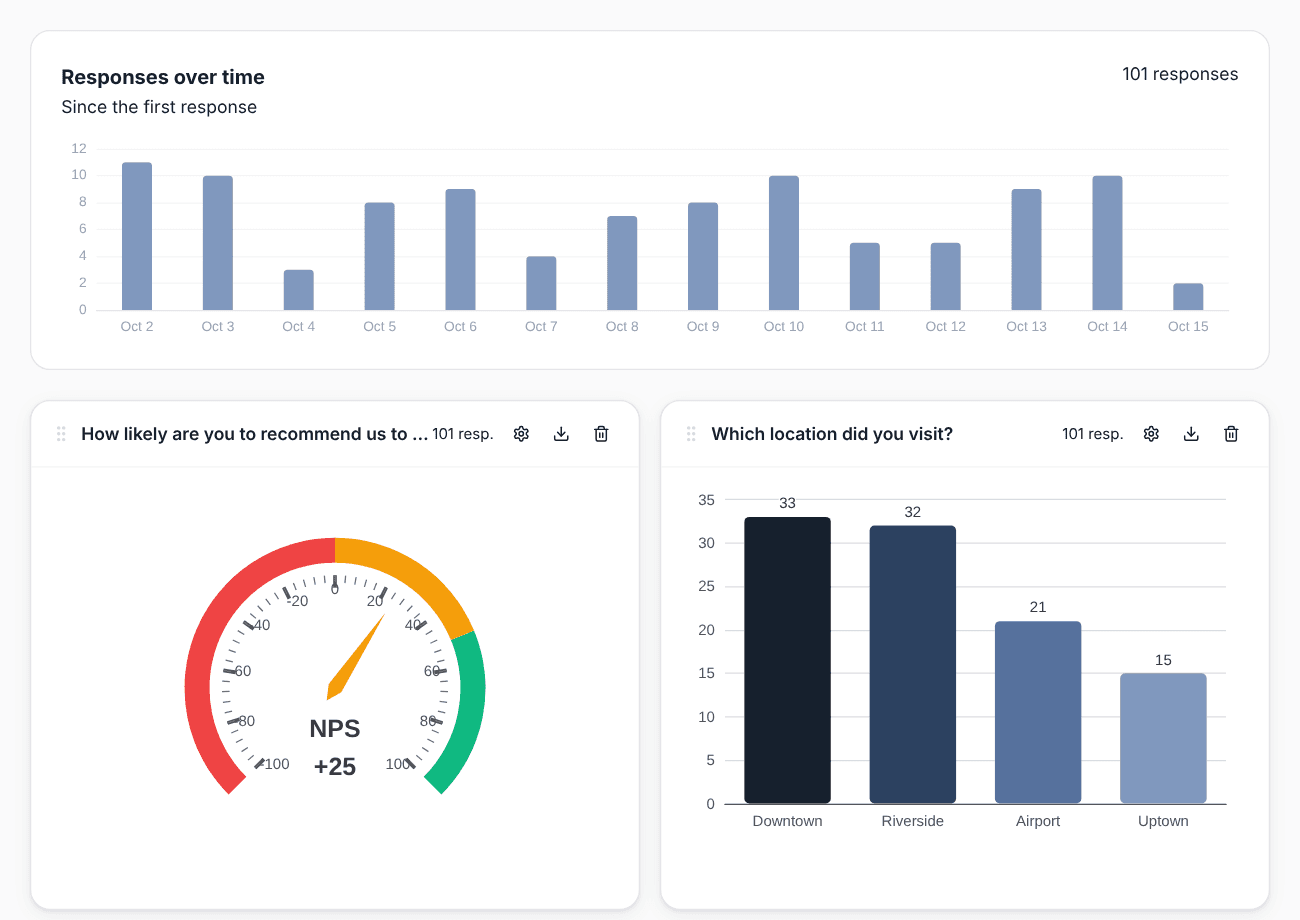
Results update on their own. Start with the simple view and switch to advanced when you want to cross-tab.
- Charts per question and responses over time
- Cross-filters: compare locations, ages or any group
- Export to Excel, CSV or PDF, or share a read-only link
Thesis Mode
Validate your thesis instrument without fighting Excel
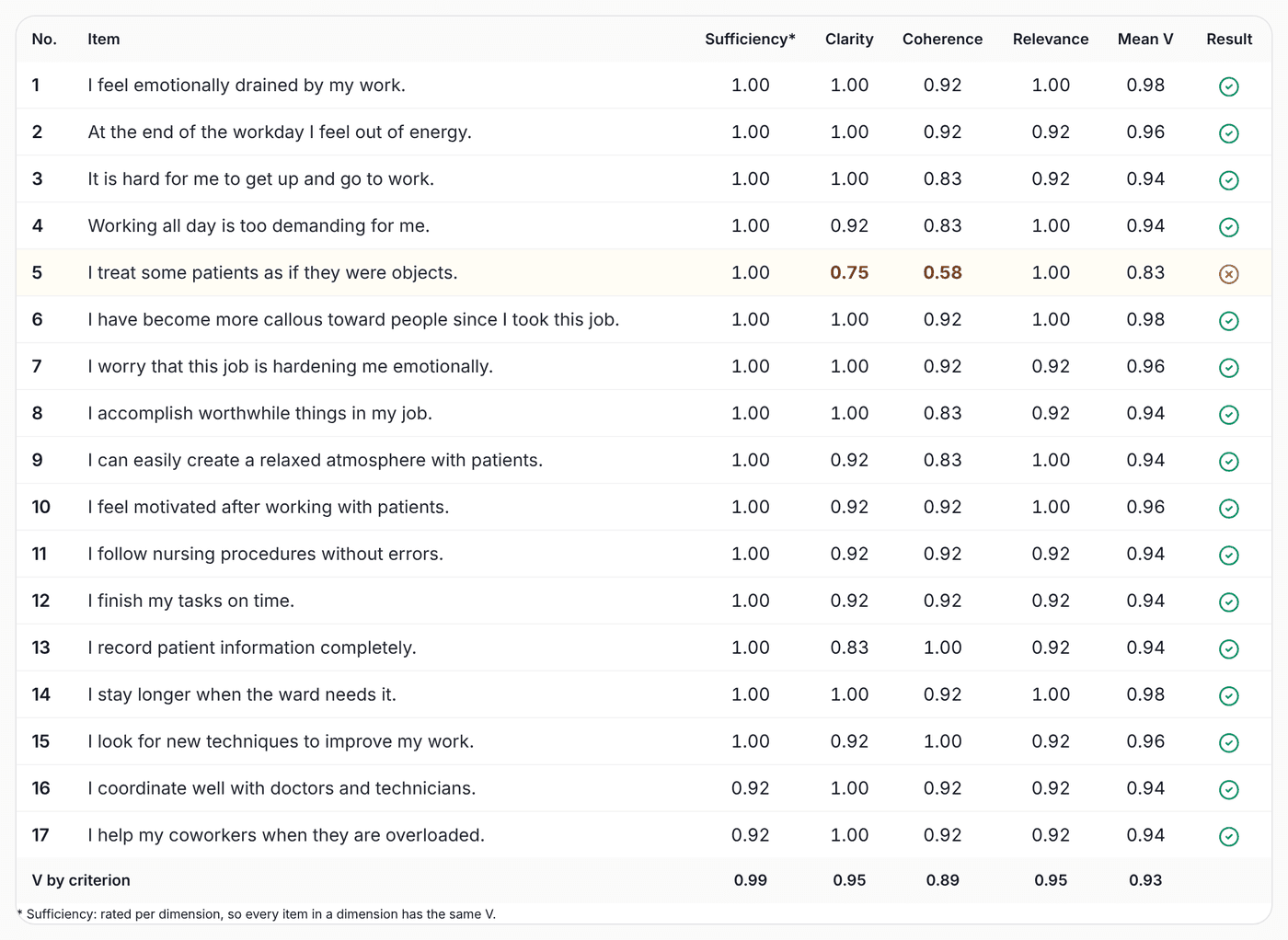
For students who use a questionnaire: organize variables, dimensions and items, gather your expert judges and reach data collection with the numbers your advisor asks for.
- Expert judges by link or entered by hand, with Aiken's V per item and per dimension
- Pilot test with Cronbach's alpha and the items worth reviewing
- Norms by level, normality, correlations and APA-style tables
- Word, Excel and SPSS downloads, plus a read-only link for your advisor
SurvIQ does not write your thesis. It runs the numbers and lays out your tables; the analysis and the writing are yours.
360 feedback
360 feedback without spreadsheets or loose emails
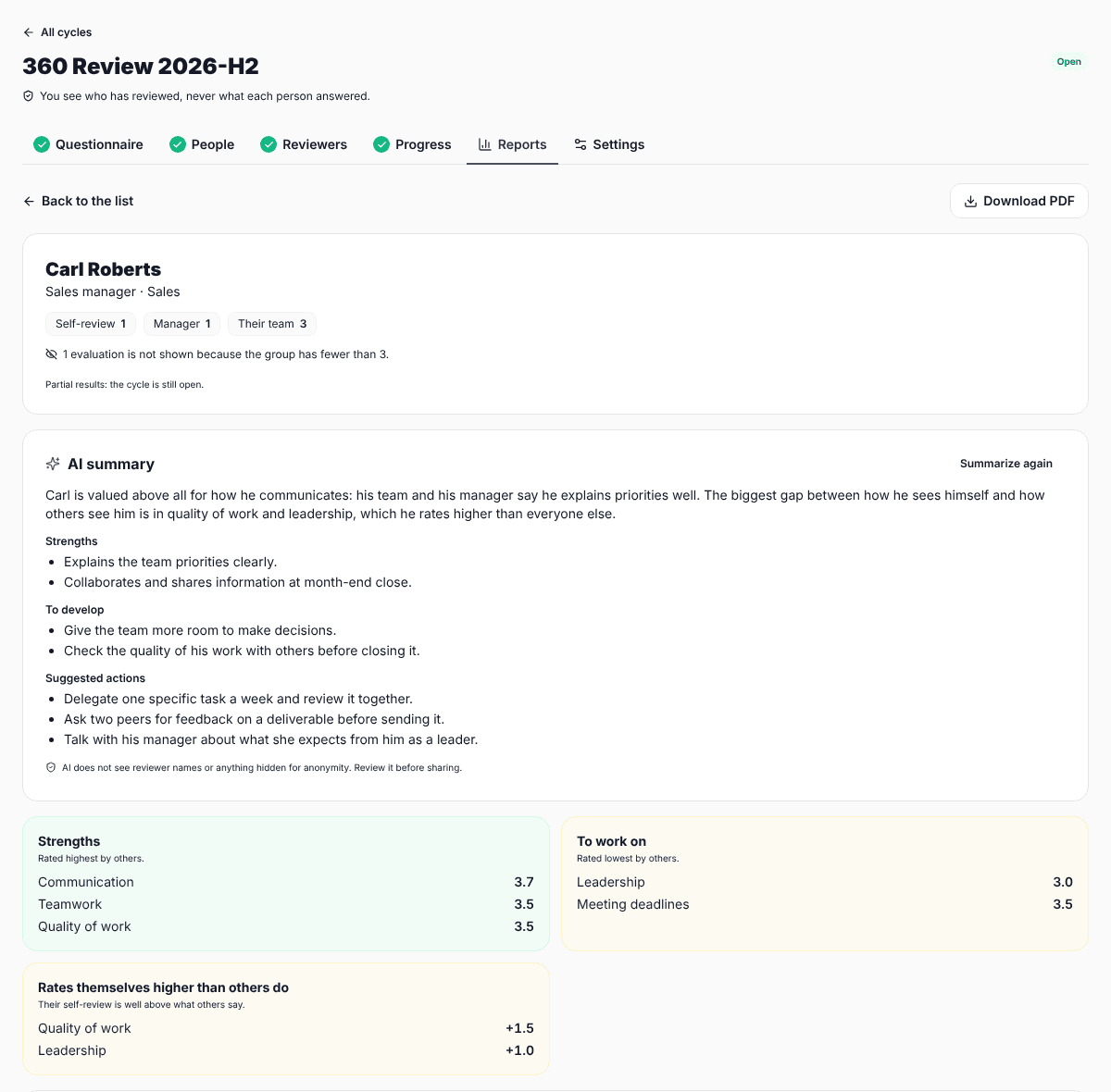
For HR: you upload your people in a spreadsheet, SurvIQ proposes who reviews whom, and each person signs in with their ID. When the cycle closes you get a report per person and one for the whole company.
- Self-review, manager, peers and team, proposed from each person's manager ID
- Access with employee ID and PIN, no accounts needed
- You see who has reviewed, never what each person answered
- PDF report per person, with gaps between how they see themselves and how others see them, plus an AI summary
Peers and team are shown only when there are at least 3 of them (you can raise it). If there are fewer, they are pooled or hidden, so nobody can guess who said what.
Performance Review
Your whole yearly performance review, in one place
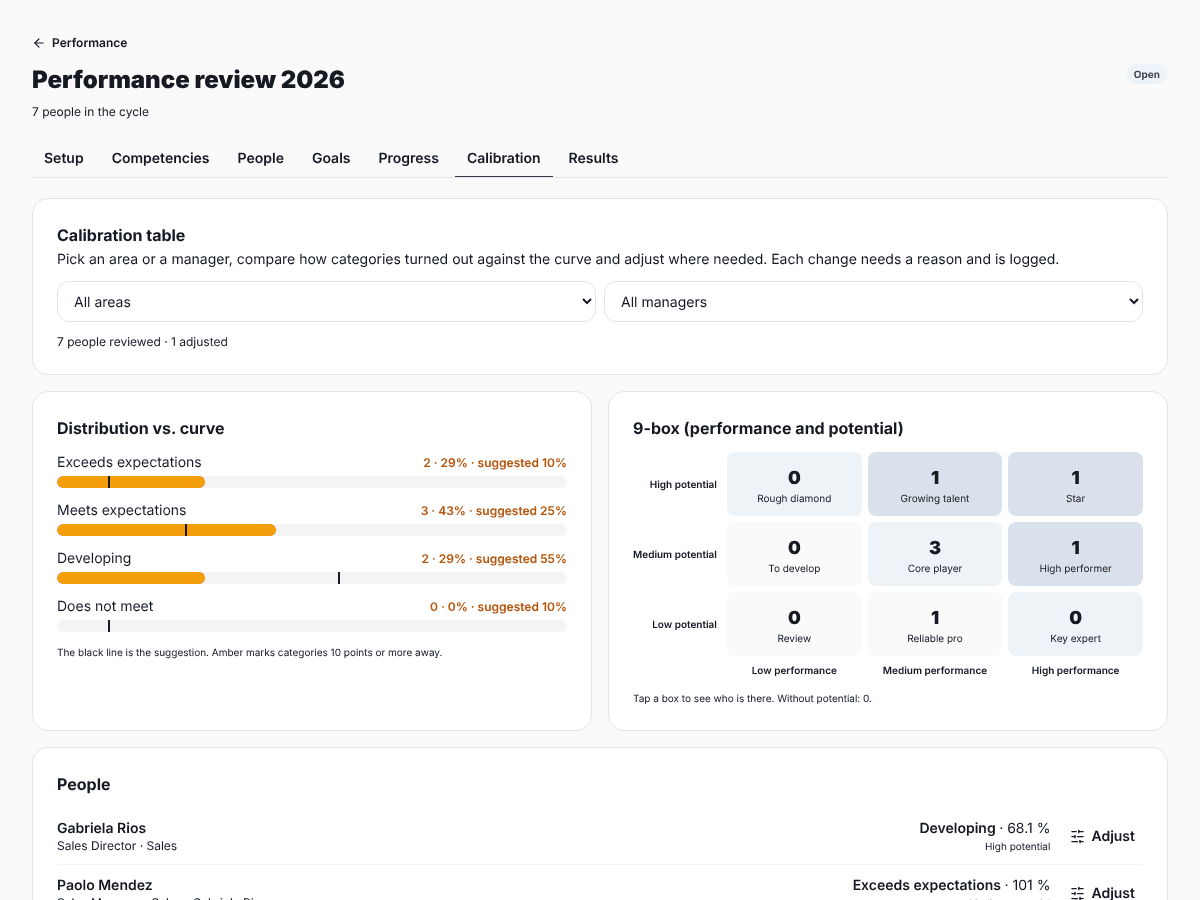
Each person sets their goals and reviews themselves in your company portal, no account needed. Managers review with everything at hand, HR calibrates on a 9-box and everyone gets their result with a development plan.
- Measurable goals the manager approves, with AI help to write them
- Stages you choose and order: goals, mid-year, self-review, peers, manager, calibration and feedback
- Automatic reminders to whoever is missing, before each deadline
- Results by area and by manager, compared with last year, plus a full Excel file
AI to build surveys and understand the answers
Create, review and translate your surveys in seconds. When responses arrive, ask your results anything and get clear conclusions, without exporting to another tool.
Before you publish
Create with AI
Write what you want to measure, or upload a PDF, and get the survey or quiz ready to edit.
Add questions
Ask for the questions you're missing right in the editor and they're added at the end.
Review before publishing
Spots confusing, biased or double-barreled questions and suggests better wording.
Translate instantly
Into Spanish, English, Portuguese, French, German or Italian in one tap: each language gets its own link and responses add up together.
When responses arrive
Automatic summary
Main themes, sentiment, real quotes and concrete recommendations.
Ask your results
“Which location is most satisfied?” The AI answers with your survey's numbers.
Categorize comments
Groups hundreds of open answers into categories with their percentage.
PDF report
Download a report ready to share with your team or client.
The free plan includes AI actions every month. You can also connect SurvIQ to Claude.
Ask Claude about your results
Connect your SurvIQ account to Claude and manage your surveys in a conversation: create them, publish them and understand what your responses say without building tables by hand.
Create surveys in one sentence
Describe what you need to know and Claude builds the survey in SurvIQ, ready to review and publish.
Summaries and conclusions
Claude reads your responses, finds the most common themes in the comments and tells you what to do about them.
Cross-tabs and charts instantly
Compare groups, find the time slot that works for most people and ask for the chart you need.
Works with every SurvIQ plan, including Free.
Plans and pricing
Start free. Change plans or cancel any time.
Offer until December 31
- 33% off monthly plans for the first 3 months
- 50% off the Thesis Pass
The discount is applied at checkout, no code needed.
Free
Explore SurvIQ with no commitment.
50 responses/month
1 user
- Up to 3 active surveys
- 10 question types
- CSV export
- Simple analytics
- 5 AI actions per month
Basic
For freelancers and personal projects.
1,000 responses/month
1 user
- Everything in Free
- Unlimited surveys
- All question types
- Conditional logic: show, hide, jump and end
- 50 AI actions per month, Advanced level
- Advanced export
- Email support
Pro
For consultants and small teams.
5,000 responses/month
3 users included, counting you
- Everything in Basic
- 200 AI actions per month
- Advanced logic: option filters, random order, multiple endings and scoring
- Workspaces and organization
- 360 feedback and Performance review: 50 people included, each extra person US$1.50 a month or US$12 a year
- Contacts (leads)
- Advanced analytics
- Multi-language surveys
- Responses to Slack or webhook (Zapier, Make, n8n)
- Priority support
Business
For agencies and growing companies.
25,000 responses/month
10 users included, counting you
- Everything in Pro
- 600 AI actions per month
- 360 feedback with unlimited people
- Performance review with unlimited people
- Dedicated support
For teams: one plan for everyone
From Pro you create an organization and your whole team works on your plan: your features, your responses, your credits and your AI. Members don't pay for a plan of their own. Pro includes 3 users and Business 10.
Prefer to pay as you go?
Prepaid credits are perfect for one-off projects. They never expire.
Credits are added on top of your current plan's features, they don't include premium features on their own.
Don't want a subscription? Buy the tier once
Pay once and keep that tier's features forever: custom themes, sending from your own email, and more. No monthly renewal. Includes a monthly response quota; if you need more, buy credits above.
Pays for itself in 5 months · ideal if you get few responses
75 responses per month included
Includes 300 bonus credits
Create account & buy BasicPays for itself in 5 months · ideal if you get few responses
200 responses per month included
Includes 1000 bonus credits
Create account & buy ProThesis Pass
US$19US$9.50 one-time · 12 months
For thesis students who don't want a subscription: one payment for your whole thesis project, from validating the instrument with judges to the APA tables.
- All of Thesis mode for 1 project, including advisor access
- 500 responses in total (pilot and sample)
- 40 AI actions in total
- Nothing is deleted when it expires: you can still view and download it
- Renew for US$10 if you need more time
Frequently asked questions
Yes. The Free plan includes up to 3 active surveys, 10 question types, and simple analytics, no credit card required.
Create your first survey for free
Free plan forever, no credit card required. Try Pro free for 7 days whenever you want.