Performance Review
Your whole yearly performance review, without spreadsheets
Each person sets their goals, reviews themselves and gets their manager’s review in their own portal. You follow progress, calibrate on a 9-box and deliver results with a development plan.
1. Upload your people once
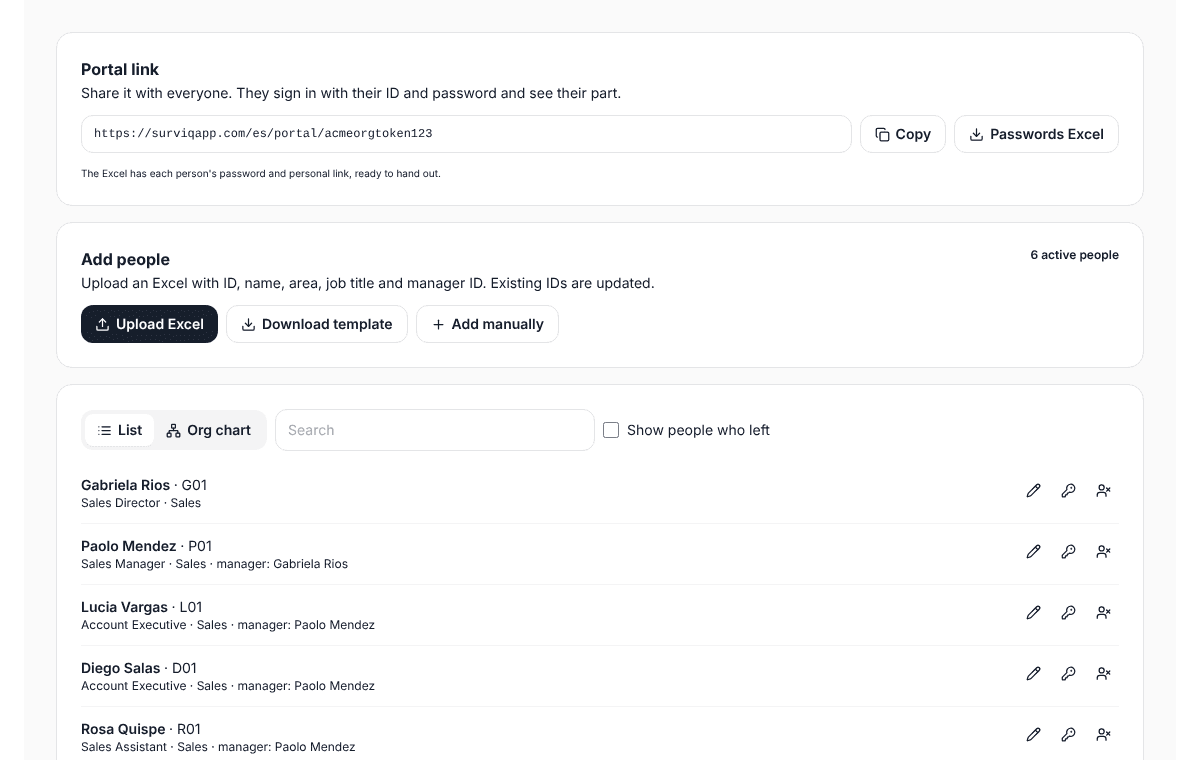
An Excel file with ID, name, area, job title and the manager’s ID. With that SurvIQ builds the org chart and knows who reviews whom. It works for every cycle.
- Each person signs in to the portal with their ID and a password, or with their own link. No account needed.
- The portal link carries your company and cycle name, for example surviqapp.com/en/portal/your-company/review-2026.
- You download an Excel file with passwords and links to hand out.
2. Goals you can measure
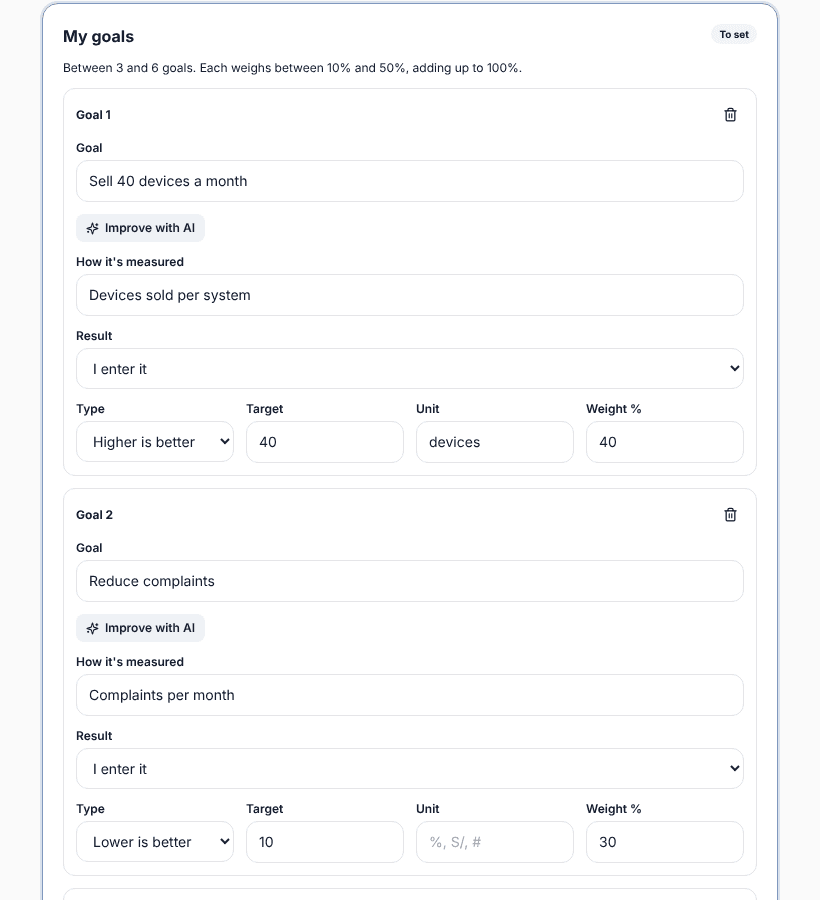
Each person (or their manager, or HR from an Excel file) writes their goals with how they are measured, the target and the weight. The manager approves them or sends them back with a comment.
- Higher is better, lower is better or yes/no, in any unit: sales, days, %, dollars.
- Area goals copied to everyone, cascading goals and manager goals that add up their team’s.
- The "Improve with AI" button turns a goal written by hand into a measurable one.
3. Managers review with everything at hand
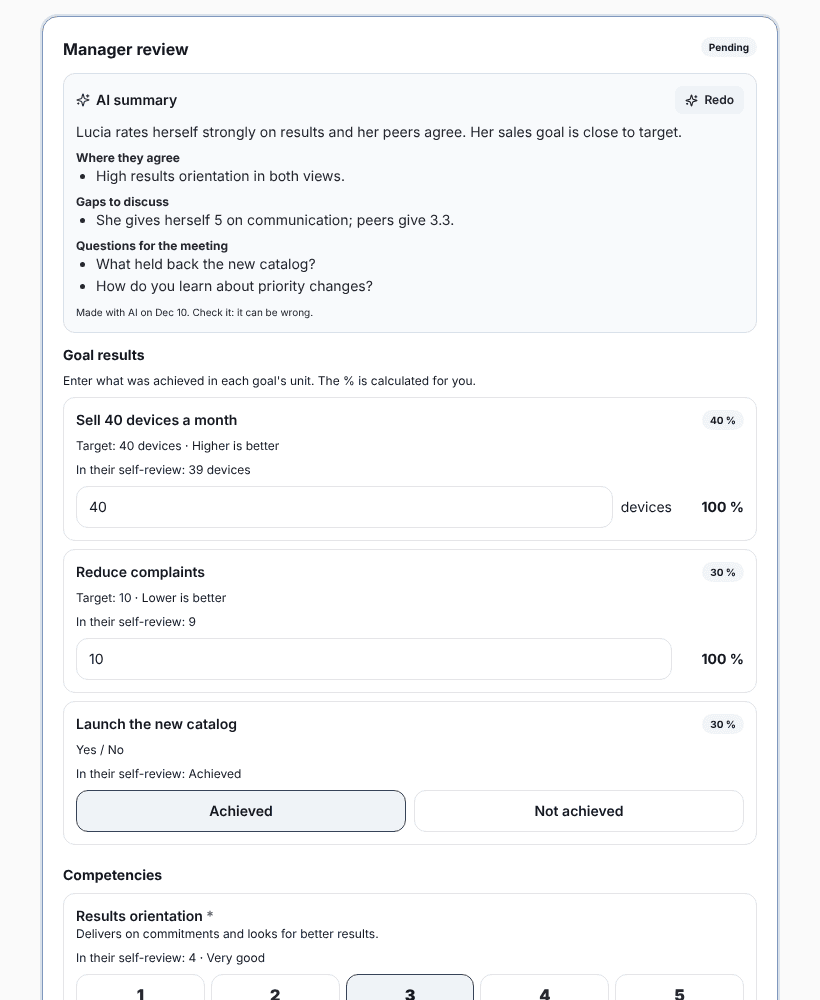
When reviewing, the manager sees the self-review, the mid-year check-in and, if you turn the stage on, anonymous peer feedback. They enter each goal’s result and rate competencies from 1 to 5. The score is calculated for them.
- An AI summary brings it all together and suggests what to talk about. It never gives a score: the manager decides.
- If you want, the manager’s manager reviews and approves before it is delivered.
4. Calibration table with a 9-box
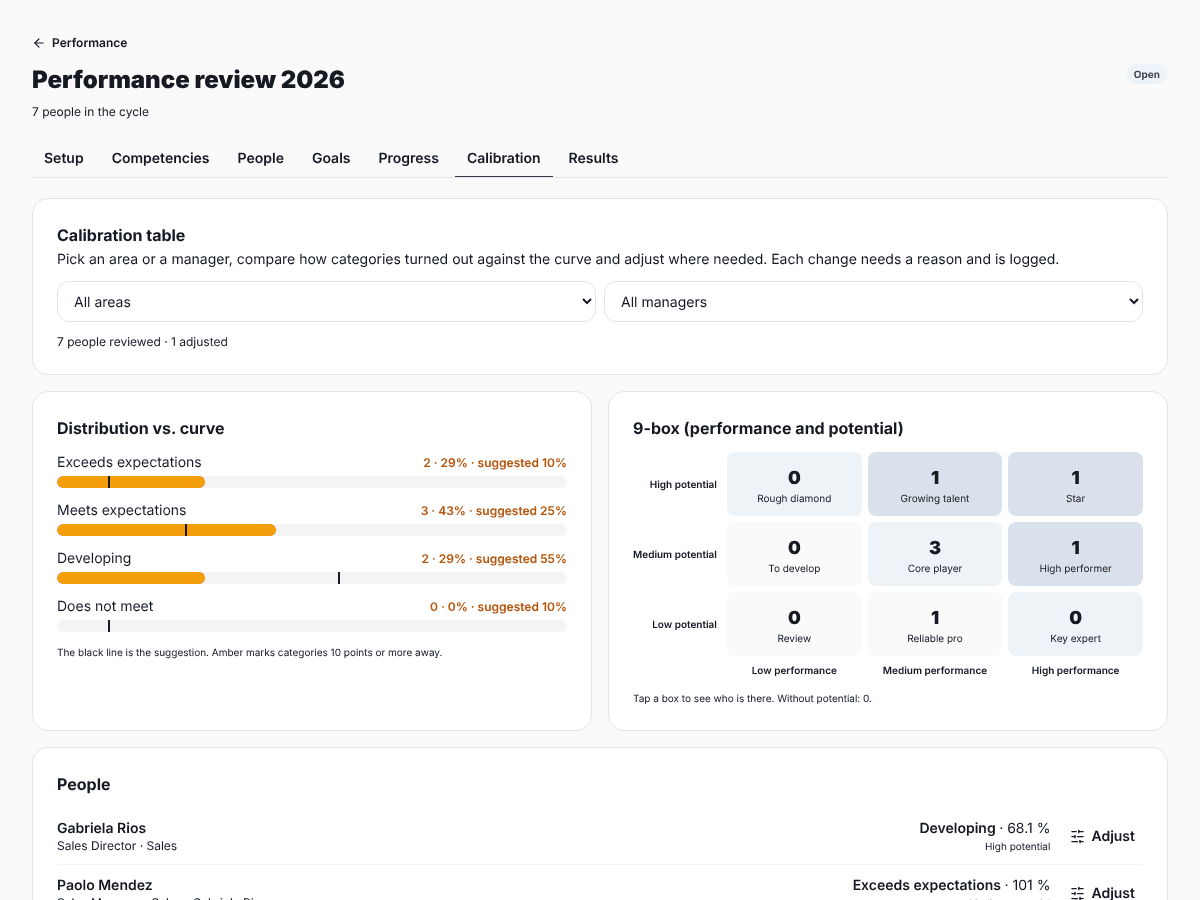
Before delivering, HR or the committee compare the distribution with a suggested curve and see each person on the performance and potential 9-box. Each adjustment needs a reason and is logged.
- Filter by area or by manager.
- The curve is a guide: it doesn’t force anything.
5. Results by area, by manager and vs. last year
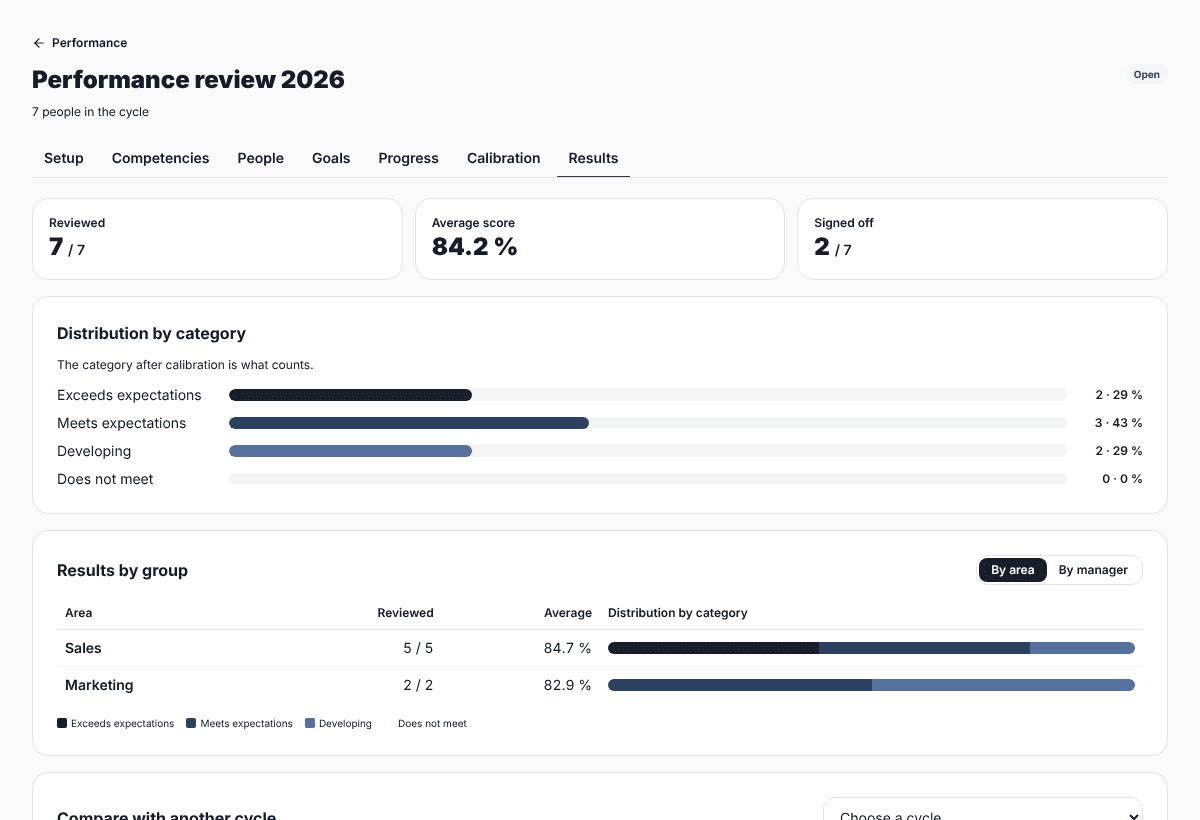
See how many were reviewed, the average score and the distribution by category for the whole company, by area or by manager. Compare with an earlier cycle to see who moved up or down.
- Excel file with a sheet per topic: scores, goals, competencies, calibration and peer feedback.
- A sheet for each person with their signature and development plan.
6. Feedback, development plan and sign-off
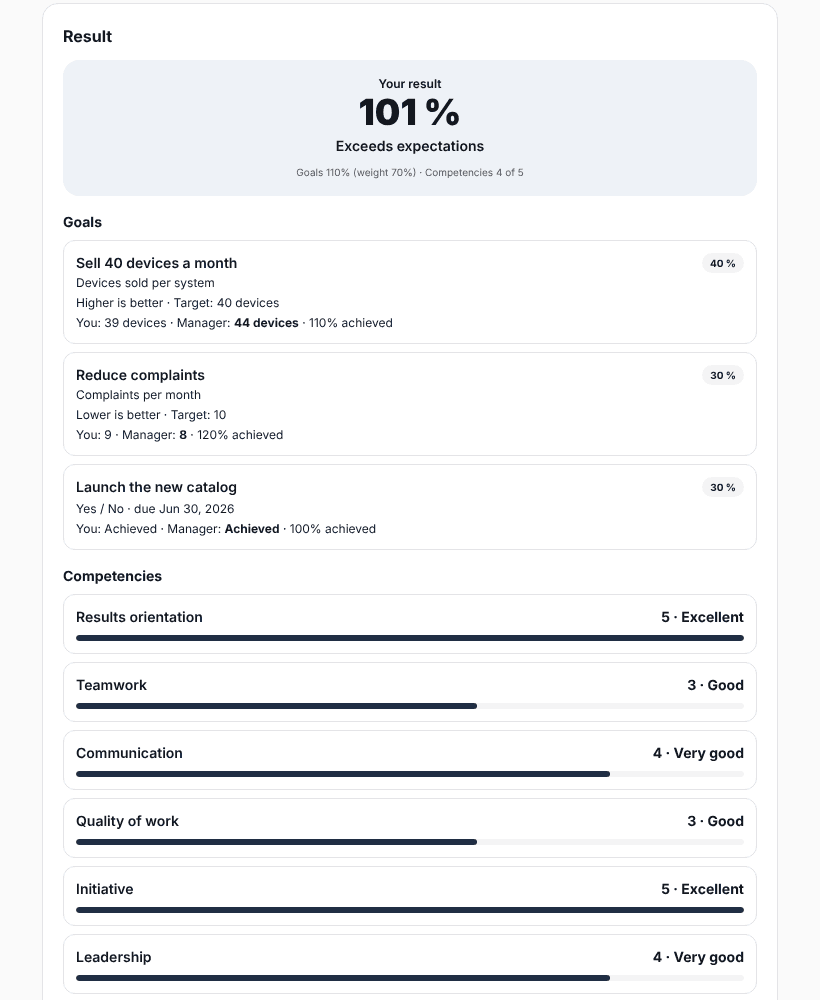
When you open the feedback stage, each person sees their result with the detail of goals and competencies. The manager leaves 2 or 3 actions with dates and the person signs off, with a signature if you ask for it.
- The person ticks the plan actions they have done.
- They can agree, agree with a comment or say they disagree.
Set it up the way your company reviews
Start from a template (Competencies only, Goals and competencies or Full, with calibration) and adjust it. Every company reviews differently, so almost everything can be changed.
- Stages you turn on, off and reorder: goals, mid-year, self-review, peers, manager, calibration, feedback and sign-off.
- Your own competencies, scale and categories, with the minimum score for each.
- Weight of goals and competencies, different by area or job title, and how much an exceeded goal can count.
- Competencies only for leaders or for certain groups.
- Emails for each stage, with each person’s own link, and automatic reminders to whoever is missing before each deadline.
- A goal tracking board during the year: each goal is a card with sub-goals, actions, progress and comments, and managers see their team’s board.
- Access for HR and the calibration committee, with their own account.
Looking for 360 feedback?
Performance Review measures goals and competencies through the manager’s eyes (and, if you want, peers). If you only need feedback from several people on each employee, see 360 Feedback. Both live in the same module and use the same directory.
What each plan includes
Cycles
- Pro
- Unlimited
- Business
- Unlimited
People included
- Pro
- 50 (shared with 360)
- Business
- Unlimited
Each extra person
- Pro
- US$1.5 per month or US$12 per year
- Business
- Not needed
Calibration and 9-box
- Pro
- Included
- Business
- Included
HR and committee access
- Pro
- 3 accounts
- Business
- 10 accounts
Plan responses
- Pro
- Not used
- Business
- Not used
You pay for the people in open Performance or 360 cycles, counted once. With the one-time plan (Standalone) you pay from the first person. If you only review for a few months, choose monthly: yearly is charged for 12 months and is not refunded when you close the cycle. The portal’s AI help (improve a goal, summary for the manager and development plan) uses your plan’s monthly AI actions, and you can turn it off.
Guides
Step-by-step manuals
How each part works, with real screenshots.
Frequently asked questions
- Do employees need to create an account?
- No. They sign in to your company portal with their ID and a password, or with their own link. They only see their own review and, if they manage people, their team’s.
- Can I use my own competencies and categories?
- Yes. Write your competencies with a description, your 1-to-5 scale and your categories with the minimum score for each. You can also have competencies only for leaders or for certain areas.
- How is the score calculated?
- Each goal gives an achievement % based on its type (higher is better, lower is better or yes/no), with the cap you choose. Competencies are averaged. The final score mixes both with the weight you set, and the category comes from that score.
- Is peer feedback anonymous?
- Yes. It is only shown together and only if at least the minimum you choose answer (3 by default). If fewer answer, nobody sees it.
- What does the AI do?
- It helps write measurable goals, summarizes the self-review and feedback for the manager, and suggests a development plan. It never gives scores. It uses your plan’s AI actions and you can turn it off in the cycle setup.
- Can I upload goals from Excel?
- Yes. HR can upload everyone’s goals in an Excel file, or let each person or their manager write them in the portal.
- Can I compare with last year?
- Yes. In results, pick an earlier cycle and see how the same people changed, by area and by manager.
- What happens to my people’s data?
- It’s yours. SurvIQ never sells anyone’s data. For AI help, only what is needed is sent (first name, job title, goals, scores and comments), never emails or IDs.
Try the review with your team
Create your account, upload your directory and set up your first cycle from a template.
Create a free account